Object Storage
Purpose
Object Storage provides centralized file management for all platform data. It is built on MinIO, an S3-compatible storage layer.
All datasets, model artifacts, pipeline outputs, and intermediate files are stored here. Every other platform component — JupyterLab, Dagster, MLflow, AI Models — reads from and writes to Object Storage.
User Interface Overview
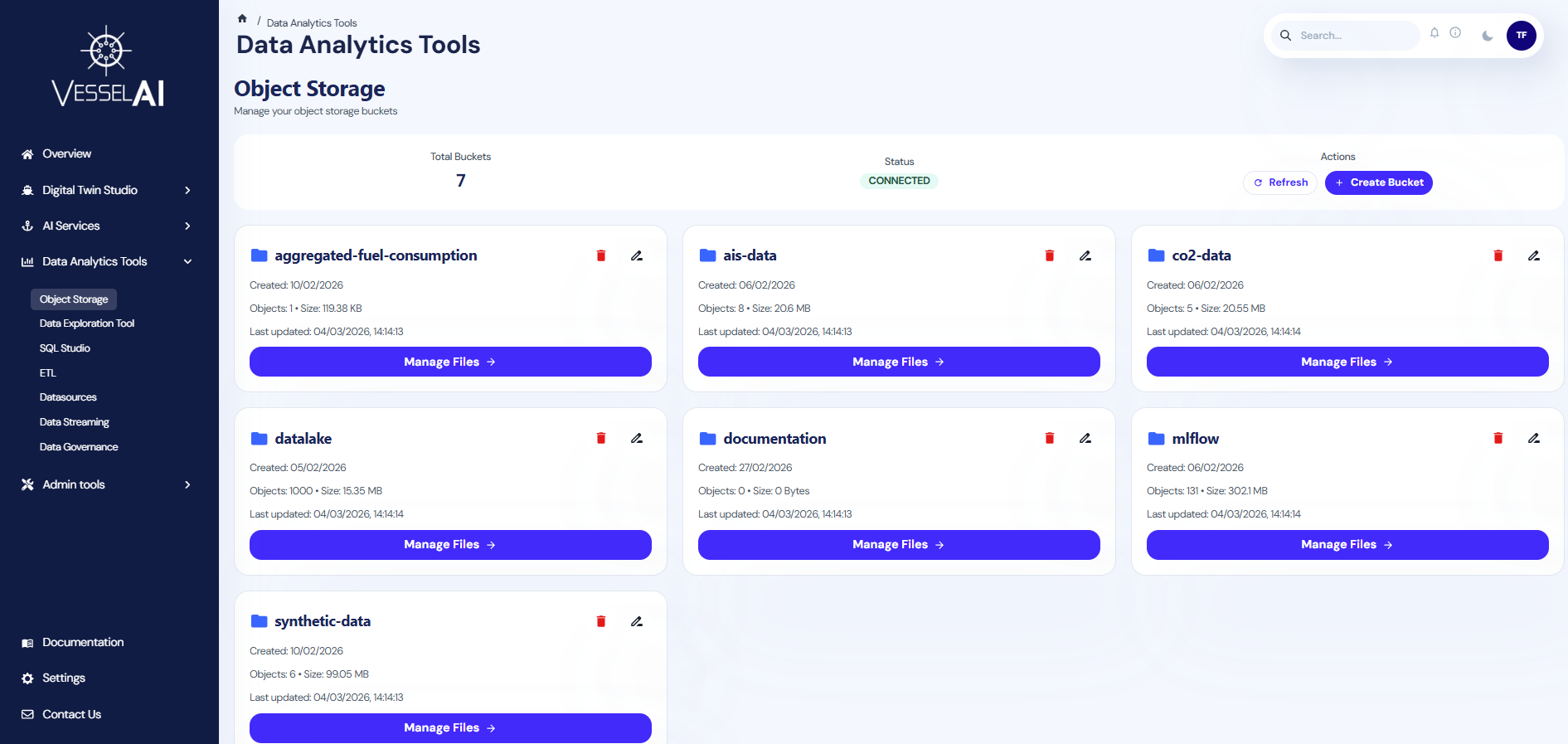
The Object Storage page is structured into two sections:
- Summary Bar (top) — Displays total buckets, connection status, and action buttons
- Bucket List (main area) — Shows all available storage buckets with their details
Summary Bar
The top panel displays:
- Total Buckets — Number of storage buckets currently available
- Status — Connection status to the MinIO backend (CONNECTED / DISCONNECTED)
- Actions — Refresh and Create Bucket buttons
Bucket List
Each bucket is displayed as a card showing:
- Bucket Name — Identifier for the storage space
- Object Count — Number of files stored inside
- Total Size — Combined storage usage
- Last Updated — Timestamp of the most recent file modification
- Encryption — Whether server-side encryption is enabled
What Users Can Do
Browse Buckets
Click on any bucket card to open the bucket detail view. This lets you navigate through folders and files stored inside that bucket.
Create a Bucket
- Click Create Bucket in the summary bar
- Enter a name for the new bucket
- Click Create
Bucket names must be lowercase and can contain hyphens. They cannot contain spaces or special characters.
Rename a Bucket
- Click the rename icon on a bucket card
- Enter the new name
- Confirm the operation
Renaming creates a new bucket, copies all objects, and deletes the original. This may take time for large buckets.
Delete a Bucket
- Click the delete icon on a bucket card
- Confirm the deletion
Deleting a bucket removes all files inside it. This action cannot be undone.
Common Buckets
Typical buckets found on the platform:
| Bucket | Contents |
|---|---|
datasets | Raw and cleaned datasets used for analysis |
co2-data | CO₂ emissions datasets for training and inference |
results | Output files from pipeline executions |
ais-data | AIS trajectory and positioning data |
synthetic-data | Generated test datasets |
dagster | Pipeline artifacts and intermediate files |
Integration with Other Platform Tools
- JupyterLab — Use
minio.read_csv()andminio.write_csv()to access data directly from notebooks - Dagster — Pipeline jobs read inputs from and write outputs to Object Storage automatically
- AI Models — Trained models and evaluation artifacts are stored in dedicated buckets
- SQL Studio — Delta tables and Parquet files in Object Storage are queryable via Trino
Official Reference
- MinIO documentation: https://min.io/docs/