AI Models
Purpose
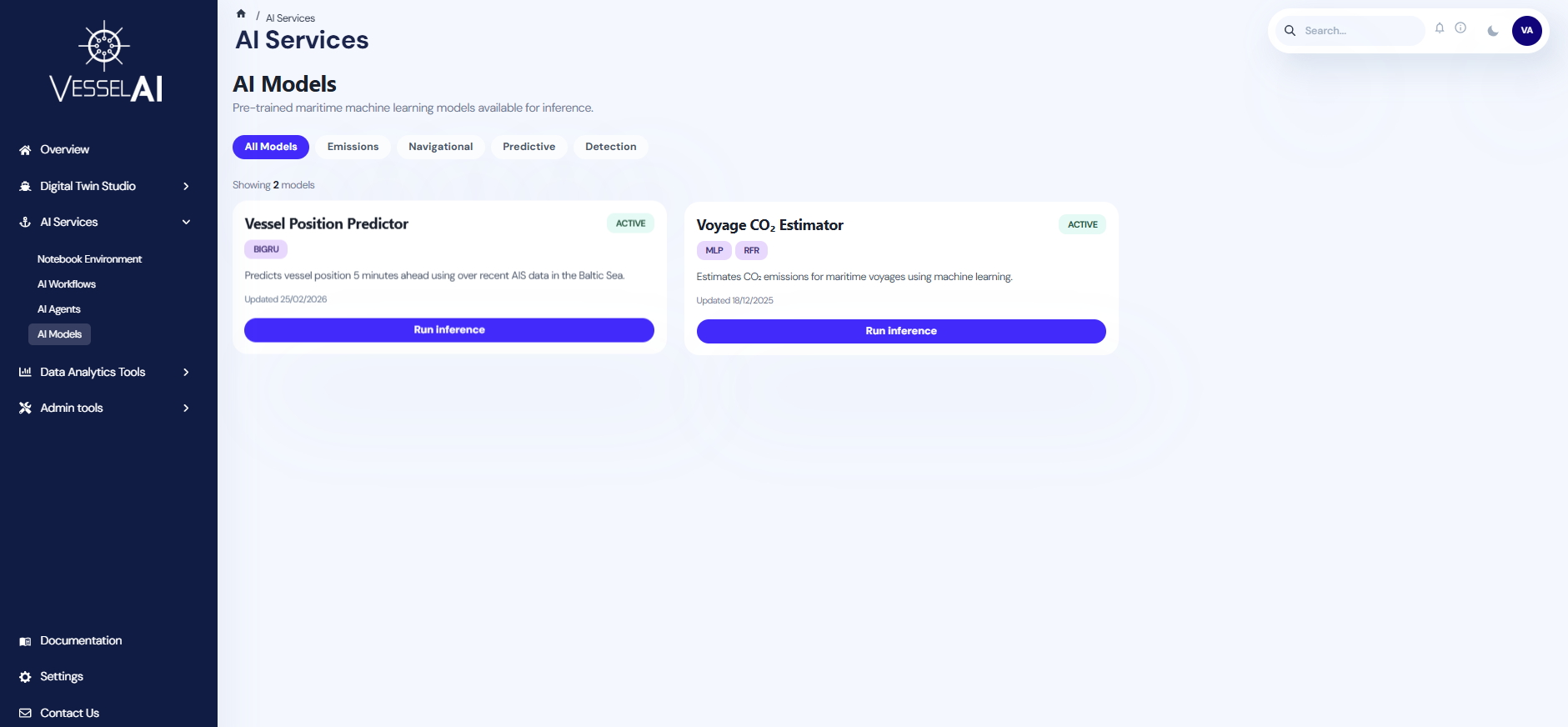
The AI Models page serves as a centralized registry of selected pre-trained models available for use within the VesselAI platform.
It allows users to discover and access curated models that are ready for inference and transform maritime data into actionable insights.
As the platform evolves, this registry will expand to include a broader selection of operational maritime AI solutions.
Available Models Overview
The main page presents a catalog of the currently available AI models in an organized grid of dedicated cards.
Each card provides the model name, a concise description of its scope and intended usage, as well as relevant classification tags regarding the model architecture.
A tab selection enables user to filter the displayed models by predefined categories, supporting future scalability as the model registry grows.
By clicking on the Run Inference button within each card, users are redirected to the model’s dedicated inference page.
Model Inference Page
Model Overview
Describes the model’s operational objective and the type of analysis it performs.
Input Section
Provides the interface for uploading the required input data file. Users currently can upload a CSV file either by drag-and-drop or by browsing their local system.
To support quick experimentation, each model page provides a small example dataset that can be downloaded and used to immediately observe the model’s functionality.
Future enhancements will enable direct selection of files already stored in the Object Storage of the VesselAI platform.
Required Schema
An expandable section defines the mandatory data structure expected by the model.
This section specifies:
- Required columns
- Data types
- Units of measurement
- Formatting constraints
Column names are case-sensitive and must match the defined schema exactly.
Model Implementation
This section defines the available implementation variants of the model.
If multiple model architectures are available, users can select their preferred implementation from the provided options. All implementations accept the same input structure and output formats.
If only one implementation is available, it is displayed by default and does not require selection.
Output Section
After triggering the inference process, the model results corresponding to each user request.
The output structure and format depends on the nature of the selected model type. Results may be presented in a table with the option to download them as a CSV files, or in other visualization forms, such as charts and maps, when required.
⚠️ The integration of new models into the platform is currently managed through a structured onboarding process. If you wish to deploy an additional model, please contact the platform team.
Example Scenario
The objective of this example is to examine the functionality of the Vessel Position Predictor Model by running a sample inference.
Step 1 - Open the Model Inference Page
-
Navigate to:
AI Services → AI Models
-
Locate the Vessel Position Predictor card.
-
Click Run Inference to open the model’s dedicated inference page.
Step 2 - Prepare the Input Data
- If you already have the required AIS data:
- Expand and review the Required Schema section.
- Prepare the data as a CSV that follows the required schema.
- Otherwise, click the Download example CSV button to obtain preformatted dataset containing a 10-step AIS sequence and immediately test the model.
Step 3 - Upload the CSV File
In the input section, upload your CSV file by either:
- Drag-and-dropping the file into the upload area, or
- Clicking browse to select it from your local system.
Step 4 – Run Inference
- This model currently provides a single implementation, which is preselected by default
- Click Run inference to trigger the inference run.
Step 5 - Review Results
After execution, the predicted vessel trajectory is displayed in the Output section as an interactive map.
- The visualization presents:
- The observed AIS positions provided by the user,
- The predicted future position 5 minutes into the future,
- Users can zoom and pan the map to inspect the prediction in greater spatial detail.